How do I check whether an IECEx certificate is valid online?
Abstract
Search the certificate number in the official IECEx online certificate system. It is valid if the status on page 1 is Current. Then compare the online master with your copy and the nameplate: holder, manufacturer, model, marking, standards, issue and X conditions.
Open the official IECEx online certificate system (reached from iecex.com) and search the certificate number exactly as it is printed on the nameplate. The certificate is valid while the status field on page 1 reads Current. If it is not in the system, it does not exist as an IECEx certificate. Then check that the online version matches the copy you were given and the product in front of you.
Short answer
- The online version is the master. The IECEx scheme says the certificate on its website is the master and controlled version. Printed copies and PDFs are uncontrolled copies.
- Status decides validity. It is Current, Suspended or Cancelled. An IECEx certificate has no expiry date, and its status can change at any time.
- A suspension has a date. The scheme states that equipment made before the date of suspension is not affected by it. Equipment made after it is not covered.
- Several issues can be Current at once. A new issue does not cancel the earlier ones, so check which issue covers your model and date of manufacture.
- A missing signature is not a problem. Online certificates may carry no signature. The record in the online system is the proof.
Step by step: checking a certificate of conformity
- Find the right number. An IECEx certificate of conformity (CoC) number has the form
IECEx ABC 26.0123, sometimes with an X or U suffix: the letters identify the issuing certification body and the two digits give the year of issue. Do not search an ExTR or QAR reference instead. Those are reports, not certificates. - Search it in the official system. Use the link from iecex.com rather than a link or QR code taken from the document you are checking. A forged PDF can point anywhere.
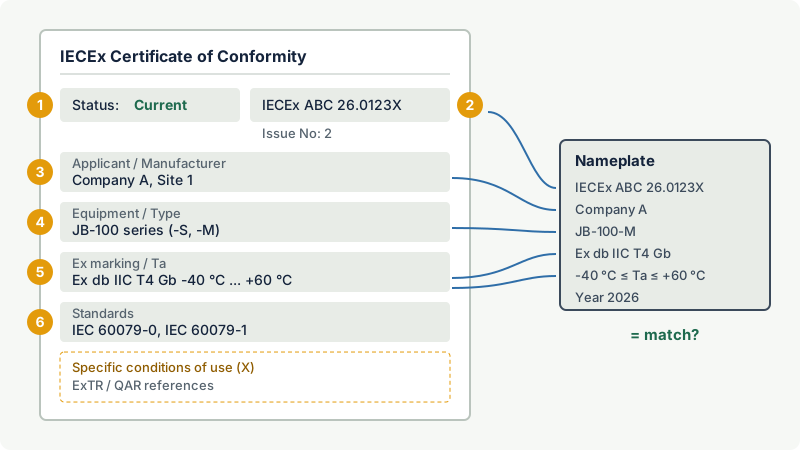
- Read the status in the upper left of page 1. Current means valid. If it shows Suspended or Cancelled, note the date shown and compare it with the date of manufacture on the nameplate.
- Check the holder and manufacturer. The applicant, the manufacturer and the manufacturing locations must match the company that supplied the product and the factory that made it.
- Check the equipment. Equipment name, type code and the variants listed must include the exact model you have, with its options.
- Check the marking and ratings. The Ex marking (for example
Ex db IIC T4 Gb), the ambient temperature range and the electrical ratings on the certificate must match the nameplate. - Check the standards and issue. The certificate lists the standards and their editions. If the project specifies particular editions, they must be there. If several issues exist, read the "details of certificate changes" to see which issue introduced your variant.
- Read the specific conditions of use. An X after the number means there are conditions the installer and user must meet. A U means an Ex component, which is not complete equipment.
- Record the check. Save or print the online version with the date of the check in the project file. Repeat the check before installation on long projects, because the status can change after delivery.
What the result means
| What you find online | Meaning | Action |
|---|---|---|
| Found, status Current, content matches | Valid certificate for this product | Accept and file the dated check |
| Found, status Current, model or marking differs | Genuine certificate, but not for this product | Ask the manufacturer which certificate covers it |
| Found, status Suspended | New production not covered from the suspension date | Compare with the date of manufacture; ask the manufacturer |
| Found, status Cancelled | The certificate no longer covers production | Do not accept new stock; for items already made, ask the certification body for written confirmation |
| Online version differs from the supplied PDF | The copy is outdated or altered | Rely on the online master; query the supplier |
| Not found | Not an IECEx certificate | Do not accept; contact the named certification body through iecex.com |
A Current status covers the design and the certified production. It says nothing about the condition of a particular item, how it was installed, or whether a repair kept its protection. Those are checked on site.
Why IECEx certificates do not expire
A CoC stays alive through factory surveillance. The scheme's FAQ explains that the manufacturer's factories are audited by an IECEx certification body every 12 to 18 months, so the certificate is in effect reconfirmed at each audit. It has no expiry date for as long as the manufacturer lets the certification body audit the factory and the audits succeed. A common reason for suspension or cancellation is that the factory's quality system no longer gives confidence that production matches the certified design. A suspension can be lifted after corrective action, and the status then returns to Current.
A newer edition of a standard does not invalidate an existing certificate. Under the IECEx rules, new certificates are issued against the current edition of a standard or the one before it, but an existing certificate does not have to be brought up to a later edition. If your specification requires a particular edition, check the standards list rather than the status.
Common mistakes
- Trusting the PDF or the QR code on it. The online system is the master. Reach it from iecex.com yourself.
- Stopping at "Current". A Current certificate for another model, manufacturer or marking does not cover your product.
- Searching the ExTR number. A test report alone is not certification.
- Assuming the latest issue replaces the earlier ones. Earlier issues can remain Current. Find the issue that lists your variant.
Related on excodex
- How to verify that an Ex certificate is genuine
- The IECEx scheme explained: CoC, ExTR, QAR and the online certificate database
- Why does an IECEx certificate show issue numbers, and which one is valid?
- What should procurement check on an Ex certificate before buying?
- Tools: Ex marking check, standards space IECEx
Standards and further reading
- IECEx, frequently asked questions on the certified equipment scheme (master online version, status, suspension, issues, editions): iecex.com
- IECEx online certificate system: iecex-certs.com
- IEC 60079-0, explosive atmospheres: general requirements for equipment (marking, certificate reference with year of issue, X and U).
- ISO/IEC 80079-34, application of quality management systems for Ex product manufacture (the basis of the QAR).
This article is general technical information prepared by the excodex editorial team. It does not replace the applicable standards, the equipment certificates and instructions, national regulations or the assessment of a competent person.